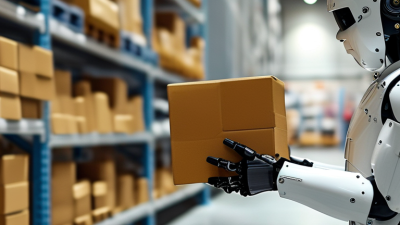
What Are Picking Robots and How Do They Work?
A picking robot is a robotic system that identifies, grasps, and moves items, often in warehouses or factories. It may work beside conveyors, shelves, bins, or human operators. The task looks simple: locate a carton, close the gripper, and place the item in the right tote. In practice, each step depends on sensing, software, and reliable movement. A glossy package can reflect light. A soft bag can collapse. Small errors matter.
The International Federation of Robotics reported 553,052 industrial robots installed worldwide in 2022, a 5% increase from 2021, in its World Robotics 2023 report. This figure covers industrial robots broadly, not picking robots alone. That distinction matters. As roboticist Rodney Brooks has noted, “Picking up a random object is one of the hardest things for a robot to do.” A picking robot typically uses cameras or other sensors to detect an item, software to estimate its position, and a gripper or suction tool to lift it. It then checks the result and moves the item to a destination. Some systems use machine learning to handle new shapes, but performance can still fall when objects overlap or lighting changes. Real deployments need testing, maintenance, and human oversight. The technology is capable, not magic. This article explains how picking robots work, where they are useful, and what their limits mean for everyday operations.
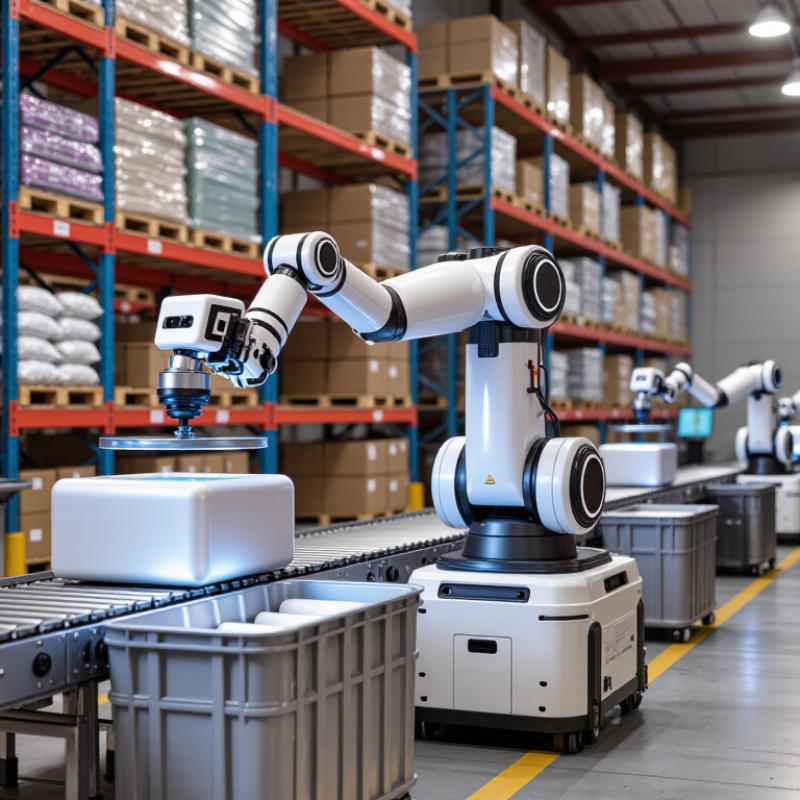
What Picking Robots Are and the Tasks They Perform
Picking robots are automated systems that identify items, grasp them, and move them to a designated location. In warehouses, they often collect products from shelves or bins to fill customer orders. Some systems also move goods between storage areas, sort parcels, or transfer items onto conveyors. The exact task depends on the robot’s tools and the facility’s layout.
A typical picking cycle starts with software assigning an item and location. Cameras or other sensors help the robot estimate where the item is and how it is positioned. Its arm then selects a suitable grip, using fingers, suction, or another end effector. After lifting the item, the system may check its identity or confirm that the pick succeeded. Not magic. Lighting, crowded bins, and shiny packaging can still cause errors.
Picking robots work best when item data, storage locations, and workflows are kept reasonably consistent. A robot may handle uniform boxes quickly but struggle with a soft bag folded behind another product. Human workers often manage exceptions, restock awkward items, and review failed picks. That division of work is practical, though not perfect. Teams should track mis-picks, cycle times, and downtime, then adjust layouts or gripping settings based on real operating results. A picking robot is not simply an arm that grabs things; it is part of a coordinated process involving sensing, movement, software, and people.
The Main Components of a Picking Robot
Picking robots use sensors, software, and mechanical tools to identify and move items. A vision system, often paired with depth sensors, reads an item’s position, shape, and orientation. The controller turns that information into movement instructions. In a busy warehouse, a box may shift slightly between scans, so accurate sensing matters.
The robotic arm or mobile base provides movement, while the end effector does the gripping. It might use suction cups for smooth cartons or fingers for rigid objects. A controller coordinates these parts and checks whether each pick succeeded. Safety sensors can slow or stop movement when a person enters the work area. No setup is perfect: reflective packaging, soft bags, or crowded bins can still cause missed picks. These cases need testing and adjustment.
Tips: Match the gripper to the actual items, not just sample products. Test with varied packaging and lighting, and review failed picks regularly. Small calibration errors can add up.
How a Robot Identifies and Selects an Item
A picking robot identifies an item using cameras, depth sensors, or both. The camera captures a view of the shelf or conveyor. Software then separates likely objects from the background and estimates each item’s position, shape, and orientation. A red carton might stand out clearly against a gray belt. A clear pouch may be harder to detect. Lighting, glare, and overlapping products can affect the result.
Once the robot selects a target, it calculates a safe grasp point and moves its arm toward the item. A suction cup may lift a flat package, while fingers can grip a firm box. Sensors provide feedback during the approach, helping the robot adjust if the item shifts. Small errors still happen. A model can mistake one object for another, especially when labels or shapes look similar. That limitation deserves attention in real workflows, not just in demonstrations.
Tips: Keep items spaced apart and use steady lighting where practical. Check failed picks and review the camera view; patterns in those misses can reveal poor angles or confusing packaging.
| Stage | What the Robot Does | Typical Inputs or Tools | Result | Practical Considerations |
|---|---|---|---|---|
| 1. Receive a picking task | Gets an instruction specifying which item to retrieve and where it should go. | Warehouse control software, a task queue, item identifiers, and destination information. | A pick request with a target item and a work location. | Item records and location data need to be current so the robot searches the right area. |
| 2. Observe the work area | Scans a shelf, bin, tote, or conveyor to locate objects and assess the scene. | RGB cameras, depth cameras, laser scanners, or combinations of sensors. | Image or depth data describing visible objects and nearby obstacles. | Lighting, reflective surfaces, occlusion, and tightly packed items can affect sensing. |
| 3. Identify the target | Distinguishes the requested item from other objects in view. | Object-detection software, image features, barcodes, labels, or stored item images. | A candidate object matched to the pick request, often with an estimated position. | Similar-looking products may require clearer views or additional label information. |
| 4. Estimate position and orientation | Calculates where the item is and how it is positioned so the arm can approach it. | Camera calibration, depth measurements, robot coordinates, and motion-planning software. | A grasp pose: a proposed location and orientation for the end effector. | Accurate sensor-to-robot calibration is important for reaching the intended point. |
| 5. Choose a grasp | Selects a suitable contact point and gripping approach based on the item and available space. | Grasp-planning software, item dimensions, gripper geometry, and obstacle information. | A planned grasp and approach path. | The plan should account for fragile packaging, item weight, shape, and neighboring objects. |
| 6. Select and grasp the item | Moves the arm to the item and closes or activates the end effector. | Robot arm, suction cup or mechanical gripper, and motion and force controls. | The item is lifted or held for transfer. | Suction works best on surfaces that seal well; mechanical grippers need suitable contact points. |
| 7. Verify the pick | Checks whether the item was successfully acquired before moving it away. | Camera feedback, gripper sensors, vacuum-pressure readings, or force sensing. | A confirmation, retry, or request for human assistance. | Verification helps detect empty grasps, dropped items, or unintended objects. |
| 8. Place and report | Transfers the item to the assigned tote, conveyor, or workstation and records the result. | Robot motion control, destination coordinates, and warehouse software. | The item is placed at its destination and the task status is updated. | Safe paths and clear placement zones help prevent collisions and mis-sorts. |
How Picked Items Are Moved, Placed, and Checked
A picking robot’s work continues after it identifies an item. Its gripper must lift the object without crushing a carton or dropping a slippery package. The robot then carries it to a tote, conveyor, or order container, using programmed routes or live movement instructions. Small errors matter. A few centimeters can misalign a parcel or block the next handoff.
Movement systems coordinate the robot with nearby equipment and workers. Sensors help it avoid obstacles, while cameras or scanners can confirm that the item reached the correct destination. The International Federation of Robotics’ World Robotics 2024 report recorded nearly 113,000 professional service robots sold for transportation and logistics worldwide in 2023, up 35 percent. This figure covers a broad logistics category, not picking robots alone, but it shows how quickly automated movement is expanding.
Checking is the step that catches mismatches before they travel downstream. A system may compare an item’s barcode, shape, or weight with the order record, then flag uncertainty for a person to inspect. Real bins are rarely as tidy as diagrams suggest: labels fold, objects overlap, and packaging changes. That is where automation can hesitate. Reliable setups track these exceptions and leave room for a human handoff, rather than treating every uncertain pick as a successful one.
Where Picking Robots Are Used and What Limits Their Use
Picking robots are automated systems that locate and move items for an order. They are common in e-commerce warehouses, grocery distribution centers, and facilities handling many small parts. A robot may travel between storage shelves, identify a requested item with cameras or sensors, and place it in a tote. Some systems bring shelves to workers instead. The best setup depends on the building, inventory, and order mix.
Their limits become clear when products vary widely. A soft bag, shiny package, or tangled cable can be harder to recognize and grip than a rigid box. Crowded aisles, changing stock locations, and fragile goods also require careful planning. Robots need reliable inventory data and safe routes around people. In practice, tidy demonstrations can hide the effort needed to keep shelves organized. Even a small layout change may affect performance.
Tips: Start with a narrow, repeatable task. Measure missed picks, item damage, and worker handoffs before expanding. Check whether the robot handles your actual packaging, not just sample objects. Keep a manual fallback; real warehouses are rarely as predictable as a test area.
What Are Picking Robots and How Do They Work?
Picking robots use cameras or other sensors, software, and robotic grippers to identify and handle items. They are best suited to repeatable tasks in organized workspaces; unpredictable items and layouts can make picking harder.
How to read this: Scores are a qualitative comparison, not measured performance or an industry survey. Suitability generally increases when items and locations are predictable; fragile, deformable, or unfamiliar items can require more sensing and careful handling. Common uses include tote picking, order fulfillment, and moving items between workstations.
Related Posts
-
How to Choose Automated Picking Robots in 2026?
-
How to Choose Automated Picking Robots in 2026?
-
Best Mobile Robots in China for Global Buyers?
-
How to Choose the Best AMR Robot for Your Warehouse?
-

2025 How to Choose the Right Mobile Robot for Your Business Needs
-

How to Choose an Automated Material Handling System in 2026?